Showing posts with label tools. Show all posts

Sunday, 30 March 2014

Time to update your tools!

Tools are important  for every artist, whether it's better paper, paint with higher pigment values or digital tools that will significantly speed up your digital workflow. Especially in the digital realm tools keep rapidly evolving. And this is a good thing. Especially in the AAA games industry people expect bigger and better looking games every time.

If tools wouldn't evolve, we would no longer be able to keep up with these expectations and deliver within an acceptable budget, both time and money. Luckily there are plenty people who love making things easier, faster and better for the rest of us. And for that we should be really thankful.

I have mentioned some tools before in this blog but after the recent GDC and the announcements made during that week, I thought it would be a good moment to share some of the updates.


Quixel Suite


The first time I wrote something about the tools from Quixel was way back in October of 2010. Before it was a full company and they just released a handy tool for creating normalmaps called nDo. Over the past years they iterated on nDo and expanded with dDo, a tool that will quickly speed up your texturing workflow. I think it's great to see people with a good idea being able to create a business around it and do well.

During GDC they announced Quixel Suite, a complete package at a great price. It includes the new versions of NDO & DDO and comes with the new 3DO model viewer that hooks directly in Photoshop for direct viewing of your results. Lastly it comes with MEGASCANS, a material library full of materials scanned with surface capture technology, which provides you with all the maps you could want for your materials like normalmaps, clean diffuse/albedo, AO etc. The video below gives an overview of the tools included:


You can pre-order Quixel Suite and find more information at their website found here: Quixel.se If you would like to try it out first, both nDo2 and dDo have a trail version available at the bottom of their pages.


Marmoset Toolbag 2


Another great example of a useful tool developed for internal use that grew in a great stand alone product available to everyone. Marmoset is a stand alone model viewer/realtime renderer which is very easy and straightforward to use.  I've used the first version of Marmoset Toolbag quite a lot and I have found it incredibly useful for making awesome presentation shots of hero assets or mini-environments.

The new version, Marmoset Toolbag 2 released back in December 2013, but since I didn't really gave it the attention it deserves yet I'm giving it a spot in this post.

The new version comes with a whole bunch of new features to play with including BPR rendering, the option to add multiple meshes and a new way of using and setting up the camera for you shots. It's also much easier to build and compose bigger scenes with the new version. All these new features are build on what made Toolbag already great so if you ever used the first version of this software you'll feel right at home in this one.

The website comes with a bunch of tutorials to get you started and there is a 30 day trail so there is no reason not to give it a try. Find it here: https://www.marmoset.co/toolbag


Unreal Engine 4


Unreal Engine 4 is here, announced and released at the same time during last weeks GDC. It is available now and requires a monthly subscription. However they launched with a great deal of documentation, videos and easy-to-use website to get you started and it seems to be well worth the money.

Since this is a big new iteration there is to much new stuff in this fully functional game engine to quickly sum up. But the website and videos are loaded with everything you would want to know.

What I specifically like about Epic's approach for the release is that they brought Zak Parrish on board to work on the tutorials and documentation. He has a long history of creating training videos for the Unreal technology through 3dbuzz since Unreal 2004. He has also coauthored the Mastering Unreal books that where of great value to anyone who was looking to get started with the engine.

Find more info here: https://www.unrealengine.com/blog/welcome-to-unreal-engine-4


Cryengine - Cryengine As A Service


Crytek also had a nice announcement during GDC, Cryengine as a service.
This new service will provide its subscribers with the latest cryengine technology used in games like Ryse, which includes the new BPR pipeline and tons of updates. It will also be contentiously updated with new features as they roll out. More and more studios are starting to use the Cryengine for their next projects and now subscribers will have acces to exactly the same tools.

When the service will officially start has not be announced yet, but more info is available on the official website found here: http://www.cryengine.com/news/crytek-announces-its-cryengine-as-a-service-program

Wrapping up..

This is it for the tools updates for now, however there is a lot out there and things keep evolving so I will probably do another one of these updates somewhere down the line. If you feel there is anything worth checking out let me know. For now have fun checking out the above tools/engines and make something awesome!

Cheers!

Tuesday, 17 May 2011

My 3D toolkit

Every now and then people ask me about the kind of tools I use during my asset workflow. There's a lot of great tools out there, but here's a list of handy tools (physical and software) I can recommend from personal experience. Small and free (or relatively cheap), things that make my everyday work a little bit easier and saves me a bunch of time.

Peripherals:

Apart from having a decent pc system (there's always room for improvement) and a dual monitor set-up I use some extra input devices next to my keyboard/mouse set-up:

3D mouse
Awesome, quick and easy to use, universal 3d navigation in every program. I use a 3d mouse from 3D Connexxion everyday. Got this one 3 years ago as a present and I'm still very very happy with it. Fast and smooth navigating in your viewport without the strain on your wrist holding down Alt, middle mouse for jerky inaccurate rotations around your model. Also helps again repetitive strain injury.


Wacom tablet
Must have, best piece of equipment for sculpting and texturing. I currently use an Wacom Intuos 3 A5 Wide at this moment. There are other brands that supply tablets but nothing can really compete with the robust quality of a Wacom. As with the 3d mouse it will save you some RSI.


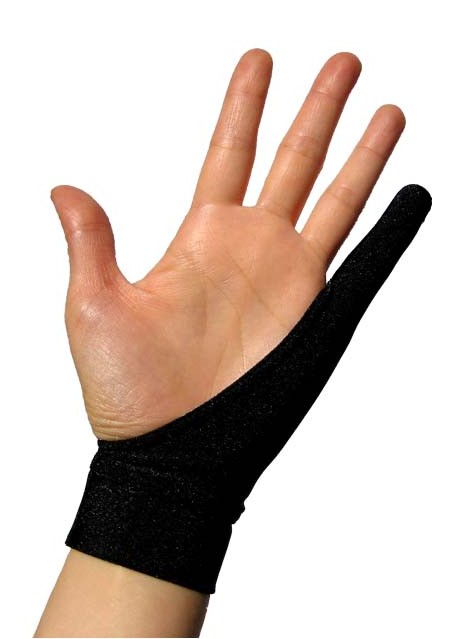
Smudgegaurd
Great, cheap addition for tablet users, removes friction and keeps your tablet clean. I know it looks like something Micheal Jackson would wear, but really, you should try it.
http://www.smudgeguard.com


Software:

Realtime viewport shader
After baking out my base textures I like to work on the texturing whilst checking my progress in the max viewport. For this I use a realtime viewport shader that shows me how the model will basically look inside a game engine. Rendering out your models and texture updates isn't really representative of how it will look in a game engine and takes way too much time. I can really recommend Xoliul's Viewport shader made by Laurens Corijn which comes with a ton of options and is also great for setting up final presentation shots.
Xoliul's Viewport Shader can be found here
And a quick and simple video on how to set it up can be found here

Meshlab - FREE
Great tool for optimizing meshes, reducing polycount and a bunch of other functions. Stand-alone application. Although if you have acces to 3ds max 2010 and above I recommend using the Pro Optimizer modifier found under your modifiers tab. More info on how to use it can be found at the Eat3D site in a quick free tutorial video
Software can be found here

nDo - FREE
A set of Photoshop functions great for generating normalmaps, it has a great bunch of options to help with your normalmap/texturing workflow.
nDo can be found here
With some great getting started info here

Nvidia Normalmap Filter - FREE
Is a bit older and can have some compatibility issues with more recent versions of Photoshop but nonetheless is a great helper in your normalmapping/texturing workflow.
The Nvidia tools can be found here

Xnormal - FREE
A stand-alone application that can be used to bake out your maps from your highpoly models. Also comes with a bunch of extra features that help in your texturing workflow, these are available in the application as well as a bunch of options under the Photoshop filters. Xnormal works very fast compared to native baking options in 3ds Max and Maya. Andy Davies over at Eat3D did a great video about using Xnormal found here
Xnormal can be downloaded here

Crazybump - PAID - trail version
Stand-alone application that can generate a variety of maps with realtime preview options and precise control through sliders. Also the option to copy/paste from and to the clipboard make it very easy to use in combination with Photoshop. Crazybump can be found here

Marmoset Toolbag - PAID - trail version
The Marmoset Toolbag is a great application for getting those great presentation shots of your models and small scenes. It has a lot of options for setting up different materials, lighting conditions and post-proces settings. You can quickly output high resolution screenshots of your model and even render out a turntable animation of your model. The Marmoset Toolbag can be found here

Max scripts
Functionality for 3ds Max and Maya can be further expanded by using custom scripts made by yourself or others. Polycount recently posted a great overview of some of the most useful scripts for 3ds Max available found here

So, this is my short list of handy tools I use on a daily basis. A lot of people will already be familiar with most of them but if you're not, I'd recommend checking these out. Also software will continue to evolve so always be on the lookout for new things that might make your everyday easier.
I'm sure in a while this list will be updated, if there's anything I should try, please let me know.

Monday, 11 October 2010

nDo normalmapping tool, check it out!

While I'm still working on new entries for this blog I would like to share a new tool with you all for creating normalmaps in Photoshop.

Fellow artist Ron Kamphuis pointed me to a recently released tool created by Teddy Bergsman called nDo.
It's a set of scripts and actions that can be used in Photoshop to create normalmaps, it also allows you to easily convert shapes and brushwork to normal information without ever leaving Photoshop. After playing around with it for a bit I can see this is going to be a great addition to the existing tools out there and a big time saver in normalmap creation workflows.

Just head over to the nDo website to download the tool. To get you started Philip Klevestav made some great tutorials on how to set this up in Photoshop and how to use the tool.

So, thank you Ron for the heads-up, thank you Teddy for this great tool and thank you Philip for getting me started with it! This rocks!